
Overview
Embeddable Components for Self-Service Subscription Management
Embeddable Components (also known as Reusable Components) are self-service, headless components that can be used by developers to set up and customize a subscription journey with in-app experiences. This is done through the delivery of a TypeScript SDK. This set of front-end interface tools is geared to enhance both the developer experience and the subscriber end-user experience.
Why use Embeddable Components
Embeddable Components allow merchants and decision-makers to create custom subscriber experiences that meet the specific needs of the end-user, which are helpful for self-servicing subscriptions in a product-led strategy approach. They are configured within your billing portal configuration settings. You can enable or disable functionalities through Advanced Billing or through code customization. Embeddable Components are highly configurable and can be styled using dynamic or static code to match a company's brand or the website's look-and-feel.
Embeddable Components are categorized into three distinct functions:
-
Billing History
Allows viewing, sorting and filtering of customer Invoices.
-
Subscription Manager
Enables the end-customer to self-serve and manage the subscription. (including, but not limited to, subscription details, payment profiles, product migrations, coupon application, and so forth).
-
Customer Details
Allows viewing and editing of customer contact details, address, and custom fields.
Technical Details
The Embeddable Components module doesn't directly communicate with the Maxio Advanced Billing API.
Rather, it leverages the Embeddable Components Backend to handle all frontend requests, perform
authentication, and transform the data into a format that can be consumed by the Advanced Billing API.
The responses are then mapped back to the Embeddable Components module, in suitable form.
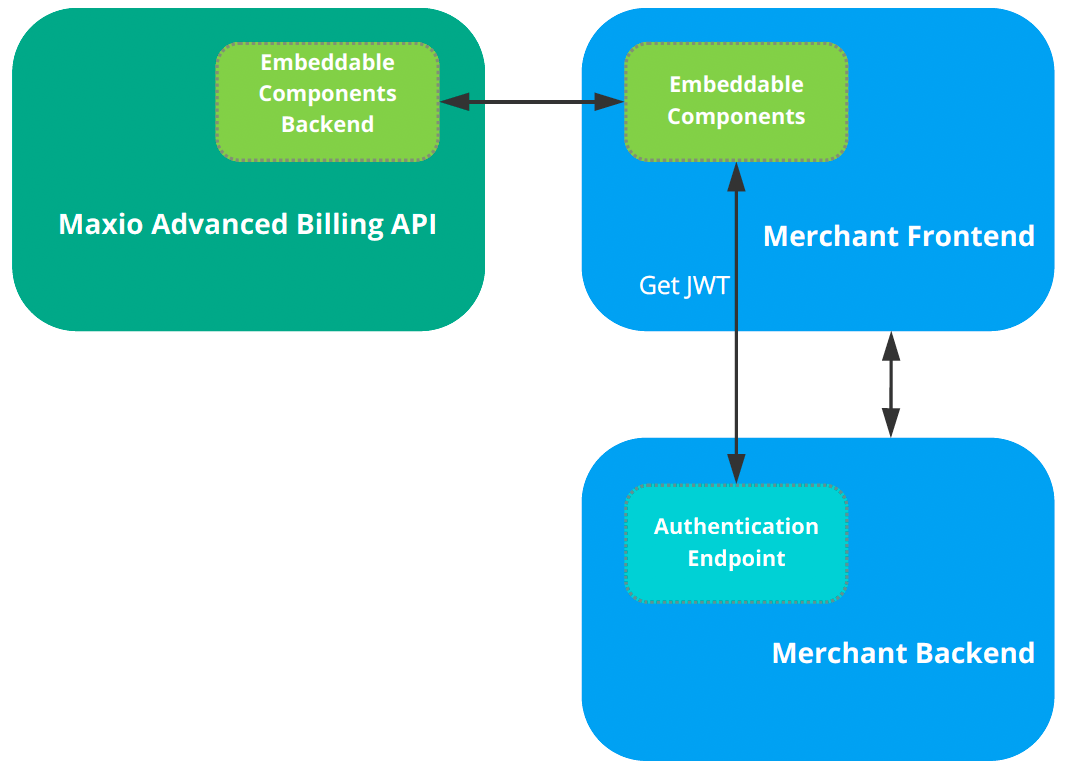
Communication Between Frontend and the Backend
All requests made by the Embeddable Components come from a web browser application provided by the merchant. To authenticate with the Embeddable Components Backend, merchants must provide a JSON Web Token (JWT) signed with the Token Sign in Key that is generated when launching the integration. This generated sign-in key is Base64 encoded. The token should contain a subject claim equal to the Maxio customer reference (which maps the merchant's internal user representation to the customer reference at Maxio).
The Embeddable Components Backend verifies the token signature, using the Token Sign in Key.
This allows requests to be executed on behalf of a specific user while maintaining security.
The token's claim issued at date is validated using the site's maximum token expiration time, which is currently one
hour.
This can be lowered using the exp claim, but it cannot be longer than one hour.
It's possible to add a second Token Sign in Key to allow for key rotation without downtime.
The Embeddable Components Backend would accept both keys to verify the token signature.
The Embeddable Components Backend also uses Cross-Origin Resource Sharing (CORS) to filter and match requests. Merchants can configure a set of Origin patterns that specify the sites where they want to embed the components. When a request is received by the backend, it first filters the provided Origin against all the patterns stored in the database. It then proceeds to the next step of JWT authorization for sites that only match the filtered patterns. The domain patterns can either be exact domains (for example, keen.io, sub.keen.io) or patterns that use wildcards ( like *keen.io or *n.io).
The wildcard asterisk (
*) must be the first character and two segments must be provided. The wildcard cannot match the entire first segment. For example,*.comis not allowed.
Authentication Endpoint
The Authentication Endpoint is a minimal backend component that merchants need to provide for their Embeddable Components. This endpoint is used by the components to fetch the token required to sign requests to the Embeddable Components Backend using the merchant Application backend for the authenticated user. Merchants need to specify the URL of this endpoint in the components' frontend initialization code so that the components know where to fetch the token from.
The endpoint should return a JSON object with the token field containing the signed token value.
For example:
{
  "token": "eyJg…"
}
The token should be signed using the Base64 decoded Token Sign in Key.
The subject of the token should be set to the Maxio Customer Reference of a customer referring to an authenticated user in the merchant's application. The iat (issued at) claim must be included in the token.
Token payload:
-
sub (subject) - Required string. Matches the Customer Reference in Advanced Billing.
-
iat (issued at) - Required timestamp. Used for token expiration validation. By default, the token is rejected if it's older than one hour.
-
exp (expiration) - Optional timestamp. Used for token expiration validation. For security reasons, you can only decrease the default token expiration to less than one hour. The token is rejected if
expis set to a time greater than one hour.
For Authentication endpoint examples, see the Code Samples article.